
On-Page SEO Checklist: Steps to Optimize Your Website

digipronix
October 23, 2026On-page SEO helps search engines understand your website content and connect it with relevant searches. A well-planned On-Page SEO Checklist helps you identify areas that need improvement and make your pages more useful for visitors.
Effective on-page SEO optimization involves more than adding keywords to your content. It includes optimizing title tags, headings, meta descriptions, images, internal links, and page structure to improve search visibility and user experience.
In this guide, we’ll explore practical on-page SEO techniques and important on-page SEO factors you can apply to your website. Follow this SEO optimization checklist to strengthen your pages and build a solid foundation for your overall SEO strategy.
What Is On-Page SEO and Why Does It Matter?
On-page SEO is the process of optimizing individual web pages to help search engines understand their content and purpose. It involves improving elements such as title tags, meta descriptions, headings, URLs, images, internal links, and content quality to make each page more relevant and accessible.
On-page SEO matters because it helps search engines connect your content with relevant search queries while making your website easier for visitors to navigate. By following effective on-page SEO practices, you can improve content relevance, strengthen user experience, and build a solid foundation for long-term organic search visibility.
On-Page SEO Checklist: 12 Essential Steps
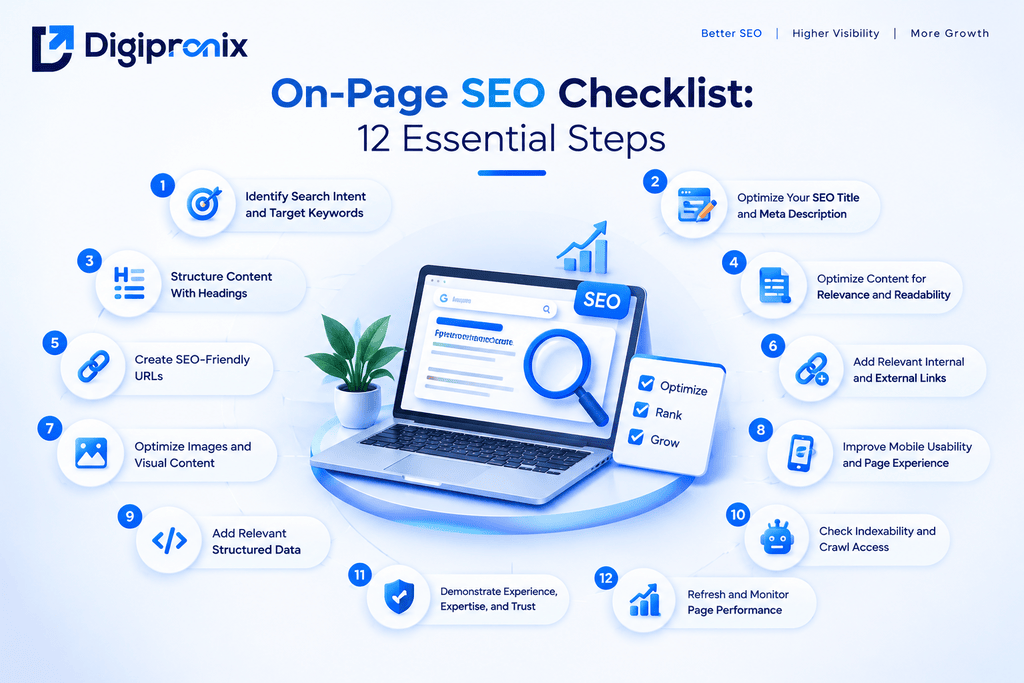
1. Identify Search Intent and Target Keywords
Before optimizing a page, understand what people expect to find when they search for your target keyword. Someone looking for a definition needs a clear explanation, while someone comparing services may want pricing, examples, or recommendations. Businesses evaluating SEO services can also review our guide to SEO pricing in India to understand common service costs.
- Choose one primary keyword that matches the page’s main topic.
- Review search results to understand what users expect.
- Include relevant secondary keywords and related questions naturally.
- Consider the audience, location, and purpose of the page.
- Prioritize relevance and realistic ranking opportunities over search volume alone.
Example: For a page targeting “on-page SEO checklist,” readers are likely looking for actionable steps they can follow to improve their website.
2. Optimize Your SEO Title and Meta Description
Your title tag helps search engines and users understand what a page covers. The meta description summarizes the page and may encourage users to visit it from search results.
Title tag checklist:
- Include your primary keyword naturally.
- Make the title specific and relevant to the page.
- Keep it concise and distinctive.
- Avoid repetitive keywords and misleading claims.
Meta description checklist:
- Summarize the page’s main value.
- Include the primary keyword where it fits naturally.
- Explain what readers will learn or accomplish.
- Write a unique description for each important page.
Google may generate a different title link or snippet based on the search query and page content. Meta descriptions are not a direct ranking factor, so focus on accuracy and usefulness rather than promising ranking improvements.
3. Structure Content With Headings
Headings make content easier to scan and help readers understand how each section relates to the main topic. A clear heading hierarchy also provides search engines with useful context about the page.
- Use a descriptive H1 for the main page heading.
- Organize major topics with H2 headings.
- Use H3 headings for relevant subsections.
- Make headings accurately reflect the content beneath them.
- Add keywords only when they fit naturally.
For this article, “On-Page SEO Checklist: 12 Essential Steps” could be an H2, with each checklist item as an H3. You don’t need to force a keyword into every heading.
4. Optimize Content for Relevance and Readability
Useful content answers the reader’s question clearly, provides accurate information, and offers enough detail to help them take action. Adding keywords repeatedly or increasing word count without adding value won’t make an article better. To understand how organic search fits into a broader marketing strategy, explore our comparison of SEO vs PPC.
- Address the main search intent early.
- Use primary and secondary keywords naturally.
- Explain important concepts in plain language.
- Include practical examples, original insights, or relevant experience.
- Check facts, update outdated information, and remove unnecessary repetition.
For stronger E-E-A-T, show genuine experience where possible, cite trustworthy sources for factual claims, and make authorship and editorial responsibility clear. No fixed word count guarantees better rankings.
5. Create SEO-Friendly URLs
A clear URL helps users understand what a page is about before opening it. Keep the address simple, descriptive, and consistent with the page’s purpose.
- Use a short, readable URL slug.
- Include the main keyword when appropriate.
- Separate words with hyphens.
- Avoid unnecessary parameters and confusing strings.
- If you change an existing URL, redirect the old address appropriately and update internal links.
Example:
Choose the final slug according to your website’s URL structure. Avoid changing an established URL without a clear reason.
6. Add Relevant Internal and External Links
Links help readers discover useful information and give search engines context about the relationship between pages. A good linking strategy connects related content naturally rather than adding links just to increase their number.
- Link to relevant service pages and related blog posts.
- Use descriptive anchor text that explains the destination.
- Check for broken internal and external links.
- Cite reliable sources when supporting factual claims.
- Ensure important pages are reachable through your website’s navigation or internal links.
7. Optimize Images and Visual Content
Images make content more engaging, but they should also help users and search engines understand the page. Proper image optimization can improve accessibility and support faster page loading.
- Use descriptive file names instead of generic names like IMG001.jpg.
- Write meaningful alt text that describes the image naturally.
- Compress images to reduce file size without noticeably affecting quality.
- Use suitable formats, such as WebP or AVIF, where supported.
- Ensure images display correctly on mobile devices.
- Add captions when they provide useful context.
Example: Instead of image1.jpg, use on-page-seo-checklist.webp for an image illustrating your SEO checklist.
8. Improve Mobile Usability and Page Experience
Your page should be easy to read, navigate, and interact with across mobile phones, tablets, and desktops. A smooth page experience helps visitors access information without unnecessary friction.
- Use a responsive design that adapts to different screen sizes.
- Keep text readable without requiring users to zoom in.
- Make buttons, menus, and links easy to tap.
- Avoid intrusive pop-ups that block important content.
- Reduce unnecessary scripts and optimize page loading.
- Monitor Core Web Vitals, including loading performance, responsiveness, and visual stability.
Test important pages on mobile devices and fix issues that interfere with reading or navigation. A good page experience supports usability, though it does not guarantee higher rankings.
9. Add Relevant Structured Data
Structured data helps search engines interpret specific information on your page. Depending on the content, it can also make a page eligible for certain enhanced search appearances.
- Choose a schema type that accurately matches the page, such as Article, Product, or LocalBusiness.
- Include only information that is genuinely present on the page.
- Ensure structured data follows Google’s guidelines.
- Validate your markup using Google’s Rich Results Test and Schema Markup Validator.
- Review important pages for errors after making changes.
For example, an informative SEO blog may use Article or BlogPosting structured data. Add FAQ content when it genuinely helps readers, but remember that FAQ schema does not guarantee a rich result in Google Search.
10. Check Indexability and Crawl Access
Even well-optimized content may not appear in search results if search engines cannot crawl or index it correctly. Check that important pages are accessible and eligible for indexing.
- Confirm that the page is not unintentionally blocked by robots.txt.
- Check for an incorrect noindex directive.
- Use an appropriate canonical URL to indicate the preferred version of a page.
- Include important, indexable URLs in your XML sitemap.
- Fix broken internal links and redirect errors.
- Use Google Search Console’s URL Inspection tool to review indexing status.
Remember that crawling, indexing, and ranking are different processes. Passing these checks helps search engines access your content, but indexing and rankings are not guaranteed.
11. Demonstrate Experience, Expertise, and Trust
Helpful content should give readers clear, reliable information they can confidently use. Demonstrating experience and trustworthiness also supports Google’s broader content-quality principles, commonly discussed as E-E-A-T.
- Provide accurate information supported by reliable sources where needed.
- Include practical examples, original insights, or first-hand experience when relevant.
- Display clear author information and relevant credentials where appropriate.
- Keep business details, contact information, and service descriptions accurate.
- Update outdated advice and correct factual errors.
- Avoid exaggerated claims, copied content, and unsupported guarantees.
For service pages, explain what your business offers and how it helps customers. For blog posts, focus on answering the reader’s question thoroughly rather than writing solely to target keywords.
12. Refresh and Monitor Page Performance
On-page SEO is not a one-time task. Search behavior, competitors, and website content can change, so reviewing performance helps you identify where improvements may be needed. For a broader approach to measuring and improving marketing results, read our guide to performance marketing strategy.
- Track clicks, impressions, click-through rate, and average position in Google Search Console.
- Review organic traffic and user engagement using suitable analytics tools.
- Check for outdated information, broken links, and missing images.
- Update examples, screenshots, and recommendations when necessary.
- Compare performance before and after significant changes.
- Revisit pages that lose visibility or no longer satisfy search intent.
Prioritize updates that improve accuracy, usefulness, and user experience. Avoid changing content repeatedly without a clear reason or enough performance data to assess the impact.
How to Use This On-Page SEO Checklist
Use this checklist when creating a new page or reviewing existing website content. You don’t need to make every change at once. Start with the issues that affect search relevance, accessibility, indexing, and user experience.
If you’re planning your overall online growth, our digital marketing strategy guide covers how different marketing activities can work together.
- For new pages: Review search intent, target keywords, headings, URLs, and internal links before publishing.
- For existing pages: Check title tags, meta descriptions, content quality, image optimization, and broken links.
- For technical checks: Review indexability, canonical URLs, structured data, mobile usability, and Core Web Vitals.
- For ongoing improvements: Use Google Search Console to monitor clicks, impressions, and search visibility, then prioritize updates based on performance data.
Work through the checklist systematically and focus on changes that genuinely help users find and understand your content. Remember that on-page SEO supports search visibility, but no checklist can guarantee rankings.
Conclusion
On-page SEO makes your website content relevant, accessible, and useful for both users and search engines. From understanding search intent and optimizing headings to improving page experience and monitoring performance, each step strengthens your website.
The key is to focus on quality rather than simply adding keywords. Create content that answers real questions, use internal links to connect related information, maintain accurate details, and review important pages regularly.
Consistent improvements make on-page SEO an ongoing process rather than a one-time task. Use these 12 steps as a practical guide to identify opportunities, improve your pages, and build a stronger foundation for long-term organic growth.