
Google Maps SEO: Strategies to Rank Higher & Improve Local Visibility

digipronix
October 19, 2026When people search for a nearby service, store, restaurant, or professional, Google Maps is often one of the first places they turn to. Appearing prominently in local results can help businesses get discovered, contacted, and visited by potential customers.
But simply having a Google Business Profile does not guarantee strong visibility. Google Maps SEO focuses on improving your local presence through an accurate Business Profile, relevant categories, genuine reviews, website optimization, and consistent business information.
Google Maps ranking depends on factors such as relevance, distance, and prominence, making local optimization more than just adding keywords. In this guide, you’ll learn practical Google Maps SEO strategies to understand how to rank higher on Google Maps and improve your local visibility.
What Is Google Maps SEO?
Google Maps SEO refers to the practice of optimizing a business’s visibility on Google Maps or localized search results, such that it gets listed in results when people look for location-based keywords.
For instance, users who search for “digital marketing agency near me” or “dentist in Surat” will be able to view some businesses that appear along with a map. Such businesses get listed depending on how relevant they are, their location, and prominence.
How Google Maps SEO Works
The Google Business Profile is essential for a company’s visibility in Google Maps. It enables the company to share information on itself like the name, category, address or location, contact numbers, website, working hours, services offered, images, and others.
Google also collects local information from other sources apart from the Google Business Profile. Google gathers local information from other sources, including websites, third-party data, and user contributions.
That means your Maps presence should not be treated as an isolated listing. Your profile, website, reviews, citations, and other business information should present a consistent and trustworthy picture of your business.
Google Maps vs Google Map Pack vs Local Search
These terms are related but aren’t the same.
Google Maps is Google’s mapping platform where users can search for businesses and places.
The Google Map Pack is the local result section that can appear in Google Search for location-based queries.
Local search is the broader search experience for queries involving a place, service, or nearby business.
Google Maps SEO can therefore support visibility across both Maps and relevant local search results.
Is Google Maps SEO Different From Traditional SEO?
While there is a lot of crossover, the approach will differ.
Traditional SEO generally focuses on improving organic search visibility, while SEO services can also support the website and local presence. Google Map SEO tends to place greater importance on the location of the business, Google Business Profile, categories, and local relevance.
The two should not be treated as completely separate activities. A well-optimized website can support your local presence, while a strong Business Profile can help customers discover the business before they even visit the website.
If you’re also planning broader SEO work, understanding SEO cost in India can help when deciding how to allocate your marketing budget.
Why Google Maps SEO Matters for Local Businesses
For local businesses, visibility isn’t only about getting website traffic. A person searching on Google Maps may already be looking for a business they can contact or visit.
A strong local presence can help potential customers:
- Discover your business
- Call your business
- Visit your website
- Request directions
- Learn about your services
- Compare your business with nearby alternatives
- Read customer reviews before making a decision
This is especially important when your digital marketing strategy combines local search visibility with other channels that help customers discover and engage with your business.
Which Businesses Can Benefit From Google Maps SEO?
Google Maps SEO can benefit many local businesses, including restaurants, stores, clinics, hotels, agencies, and digital marketing companies serving customers in specific areas.
This will depend on whether your clients come to your business or you go to them.
How Does Google Maps Ranking Work?
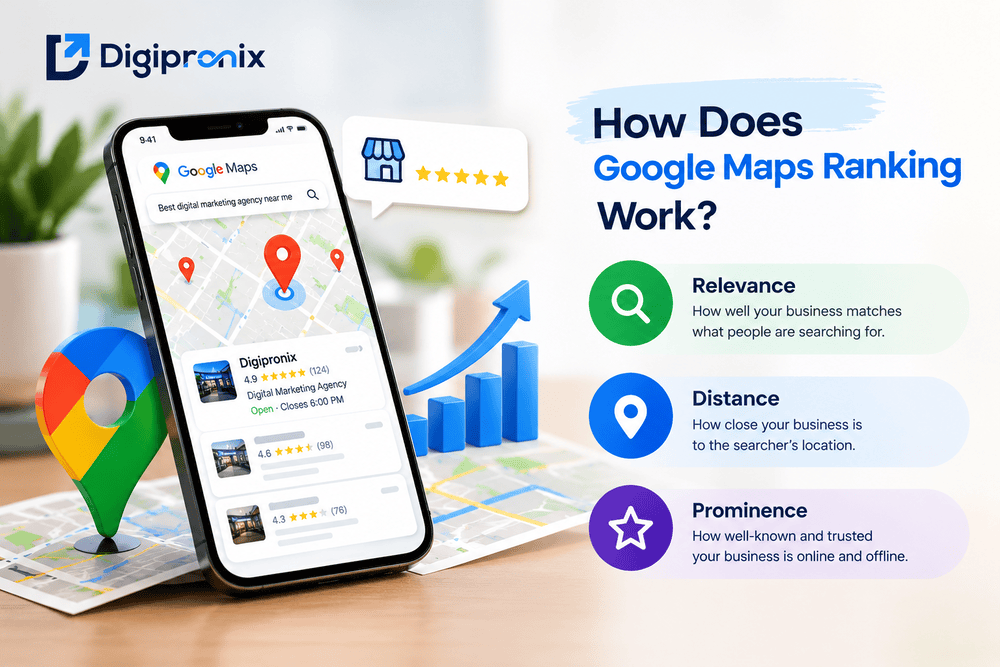
Google states that local rankings are mainly based on relevance, distance, and prominence.
Relevance
Relevance refers to how closely a Business Profile matches what someone is searching for.
A complete and accurate profile gives Google more information about the business. Categories, services, business information, and relevant website content can all help communicate what the business actually offers.
Distance
Distance refers to how far a business is from the person searching.
This is one reason Google Maps ranking can look different from one searcher to another. A business cannot simply optimize its way out of distance, particularly when competing businesses are physically closer to the searcher.
Prominence
Prominence relates to how well-known a business is. Google notes that factors such as reviews and links from other websites can contribute to prominence.
This is why Maps optimization should extend beyond the Business Profile itself.
10 Google Maps SEO Strategies to Rank Higher
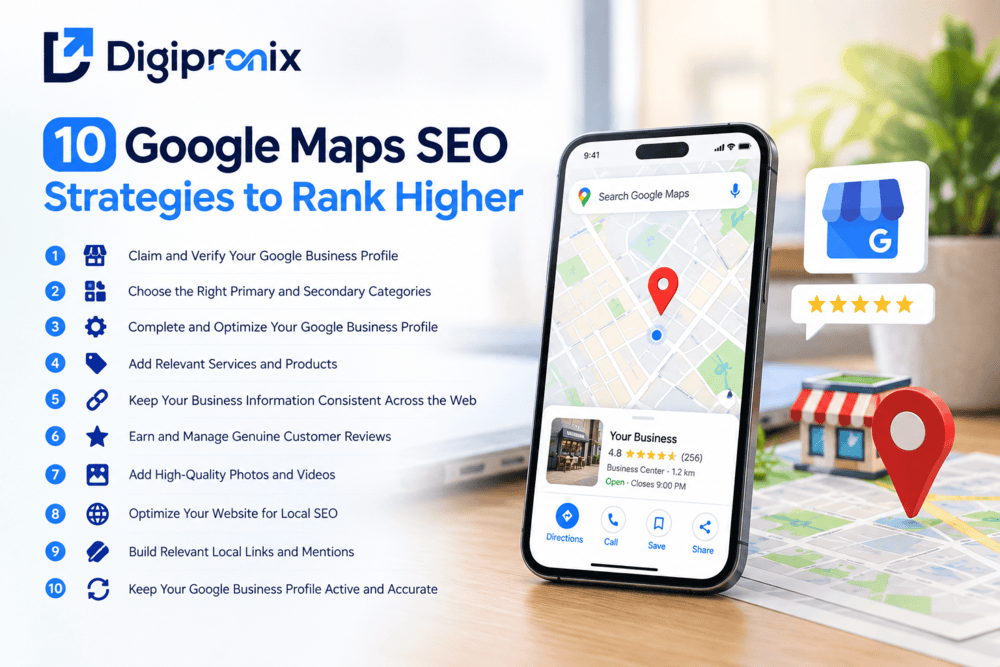
1. Claim and Verify Your Google Business Profile
Start by claiming the correct Google Business Profile and completing Google’s verification process. Verification helps establish that you are authorized to manage the business information displayed on Google.
If a profile already exists, check it carefully before creating another one. Maintaining accurate ownership and avoiding duplicate profiles is important for a clean local presence.
2. Choose the Right Primary and Secondary Categories
The main category selected should precisely indicate the kind of business you deal with.
Google says that it is advisable to select categories based on what the business is all about instead of selecting categories based on just a list of services or products. It also encourages use of as few categories as possible that will define the business.
Select other categories only if they truly reflect important facets of your business.
3. Complete and Optimize Your Google Business Profile
Fill out the profile with accurate information, including:
- Business name
- Address or service area
- Phone number
- Website
- Business hours
- Business description
- Services
- Relevant attributes
Your business name should match the real-world name customers recognize. Adding extra keywords to the business name simply to influence rankings can violate Google’s guidelines.
The description should clearly explain what you offer, who you serve, and what makes your business useful to customers. Write naturally rather than trying to repeat the same location keyword.
4. Add Relevant Services and Products
Use the available services or products sections to give customers and Google a clearer understanding of your offerings.
Keep descriptions accurate and useful. Don’t turn these fields into lists of unrelated keywords.
For eligible retail businesses, Google also provides options for showing in-store products in local search.
5. Keep Your Business Information Consistent Across the Web
See to it that your business name, address, contact number, website, and other details are consistent across directories and business listings.
Consistency allows you to have a more defined online presence. Google uses information that is extracted not only from your website but also from third-party resources, user information, and other data sources for creating local business listings.
It is better to concentrate on quality rather than quantity by making useful citations.
6. Earn and Manage Genuine Customer Reviews
Reviews are an important part of reputation management and local ranking. As per Google, reviews can affect the local prominence of your website, as well as providing helpful insight to consumers.
You should encourage legitimate customers to give their opinion after making a purchase or receiving a service from you. You may include a link or QR code for writing the review.
How to Ask Customers for Google Reviews
Keep the request simple:
- Ask after a genuine customer interaction
- Send a direct review link
- Use a QR code where appropriate
- Never pressure customers to leave a particular rating
- Never offer discounts or gifts in exchange for reviews
Google prohibits incentives for reviews and other forms of fake engagement.
Respond to reviews professionally, including negative ones. A thoughtful response can show future customers that feedback is taken seriously.
7. Add High-Quality Photos and Videos
Visual information can help customers recognize and understand a business before visiting.
Add authentic photos of:
- Business exterior
- Interior
- Products
- Services
- Team
- Facilities
- Completed work
Avoid relying entirely on generic stock photography. Real images provide customers with a more accurate impression of the business.
Google’s Business Profile tools allow businesses to add photos and videos of their location, products, and services.
8. Optimize Your Website for Local SEO
Your website should support the information presented on your Business Profile, and quality web development can provide the technical foundation for a fast, mobile-friendly local website.
Make sure important local information is easy to find and create useful pages for your services and locations where there is genuine search intent.
Useful areas include:
- Local service pages
- Contact information
- Location details
- Relevant local content
- Internal links
- Mobile usability
- Fast page performance
- Appropriate LocalBusiness structured data
Don’t create dozens of nearly identical location pages simply to target different cities. Each page should provide useful information for the people it is intended to serve.
9. Build Relevant Local Links and Mentions
Local authority can be strengthened through relevant mentions and links from legitimate websites.
Potential sources include:
- Local business organizations
- Industry associations
- Local publications
- Community organizations
- Business partnerships
- Relevant industry websites
The goal isn’t to collect as many links as possible. Focus on relationships and references that make sense for your business.
Google notes that links from other websites can be among the information associated with prominence in local results.
10. Keep Your Google Business Profile Active and Accurate
Local SEO is not something you complete once and forget.
Review your profile regularly to make sure:
- Business hours are current
- Services remain accurate
- Photos represent the business
- Important information hasn’t changed
- Customer reviews are being monitored
- Relevant updates are communicated
If your business changes its hours, services, location, or other important information, update the profile accordingly. Google specifically recommends keeping Business Profile information complete and up to date.
Google Maps SEO for Multi-Location Businesses
- Create separate location profiles: Set up the right Google Business Profile for each genuine business location.
- Keep information consistent: Use accurate and consistent business details across all locations.
- Create unique location pages: Give each location page useful, location-specific information instead of copying the same content.
- Build reviews for each location: Encourage genuine customers to review the location they actually visited or used.
- Avoid duplicate or fake locations: Don’t create profiles or pages for locations where your business doesn’t genuinely operate.
How to Track Your Google Maps SEO Performance
Ranking position alone doesn’t tell the whole story. Look at whether local visibility is helping people take meaningful actions.
- Check Google Business Profile: Monitor calls, website visits, direction requests, and other customer actions.
- Use Search Console & Analytics: See which searches bring visitors to your website and whether they lead to enquiries or conversions.
- Monitor Local Rankings: Track how your business appears for important local searches and how your visibility changes over time.
Common Google Maps SEO Mistakes to Avoid
- Small mistakes can weaken your local visibility. Keep these common issues in check:
| ❌ Mistake | ✅ Better Approach |
|---|---|
| Adding keywords to your business name | Use your actual business name |
| Creating duplicate profiles | Maintain one accurate profile for each eligible location |
| Buying or exchanging reviews | Collect genuine customer reviews |
| Selecting unrelated categories | Choose categories that match your business |
| Building low-quality citations | Focus on relevant, trusted directories |
| Leaving outdated information | Keep hours, contact details, and services updated |
| Using generic or misleading photos | Add real photos of your business |
| Expecting quick rankings | Give your local SEO efforts time to build visibility |
Google Maps SEO Checklist
Google Business Profile
- Claim and verify the profile
- Select the correct primary category
- Add relevant additional categories
- Complete business information
- Add services and products where applicable
- Keep hours and other details updated
Reputation
- Ask genuine customers for reviews
- Respond to reviews professionally
- Never buy or incentivize reviews
Local SEO
- Keep business information consistent
- Optimize relevant service and location pages
- Build relevant local citations
- Earn legitimate local links and mentions
Content & Visuals
- Add authentic business photos
- Keep visual information current
- Provide useful local website content
Measurement
- Monitor Business Profile performance
- Review Search Console data
- Analyze website conversions
- Track local visibility over time
Conclusion
Google Maps SEO is not about finding a quick shortcut to rank higher. It starts with an accurate Google Business Profile, relevant categories, complete information, genuine reviews, useful photos, a strong website, and consistent local signals.
Google says local rankings are mainly influenced by relevance, distance, and prominence. That’s why Google Maps SEO works best as part of a broader local SEO strategy focused on being accurate, trustworthy, and useful to local customers.